TI 84 Calculator Online – Free TI-84 Plus CE Graphing Calculator
Let’s be honest — not everyone has a graphing calculator sitting on their desk when they need one most. That’s why the TI 84 Calculator Online is such a game-changer. It’s a completely free, browser-based version of the Texas Instruments TI-84 Plus CE, and it works right now, on whatever device you’re reading this on. No downloads, no account creation, no waiting. Just open it and start calculating.
Whether you’re a student pulling an all-nighter before exams, a teacher prepping tomorrow’s lesson, or a professional who needs a quick graph — this online TI-84 calculator is ready when you are.
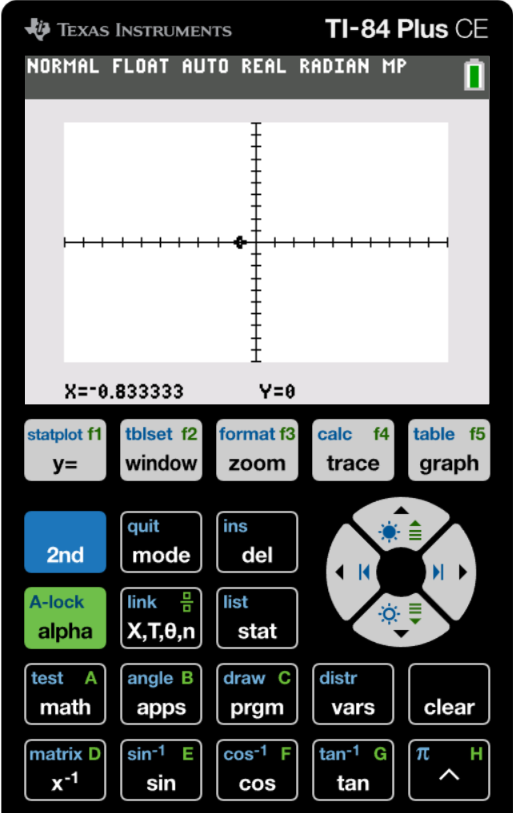
What Is the TI-84 Plus CE Online Emulator?
The TI-84 Plus CE is the graphing calculator that millions of students worldwide have grown up using. Made by Texas Instruments, it’s the go-to tool for high school algebra, precalculus, AP Statistics, and beyond. But here’s the thing — a physical unit costs over $100, which isn’t always practical.
The TI-84 Plus CE Online Emulator solves that. It’s a web-based version that mirrors the hardware almost perfectly. The Texas TI-84 Calculator Online uses the same underlying engine as the real device, so every button click, menu option, and calculation produces the exact same result. Teachers can display it on a projector during class. Students can use it from their phone on the bus. No one has to buy anything.
Key Features of the TI 84 Calculator Online
The most talked-about feature of the TI-84 Graphing Calculator Online is, naturally, its graphing. You can plot multiple functions at once — linear, quadratic, trigonometric, piecewise, you name it. Switch between rectangular, polar, parametric, and sequence modes with ease. The zoom and trace tools let you explore your graph in detail, find intersections, identify maximums and minimums, and really understand what the equation is telling you visually.
Statistical analysis is another major strength. AP Stats students will feel right at home — you get regression models, scatter plots, histograms, box plots, and the full range of descriptive statistics tools. Everything works just like the physical device, so there’s genuinely no learning curve if you’ve used one before.
Matrix operations are fully supported. You can define matrices up to 10×10, perform row reduction, calculate determinants, find inverses, and plug matrices directly into equations. For linear algebra students, this feature alone makes the emulator worth bookmarking.
Complex number arithmetic, TI-BASIC programming, list operations, table generation — it’s all here. The zoom control on the webpage itself also lets you resize the calculator display so it’s comfortable whether you’re on a phone screen or a widescreen monitor.
📊 Graphing Functions
Plot and analyze multiple functions, parametric equations, polar graphs, and sequences simultaneously.
📈 Statistical Analysis
Perform regression analysis, calculate statistics, and create statistical plots including histograms and box plots.
🔢 Advanced Math
Handle complex numbers, matrices, lists, and advanced mathematical operations with ease.
💻 Web-Based
No installation needed — works directly in your browser on any computer, tablet, or smartphone.
🎯 Exam Compatible
Identical functionality to the physical TI-84 Plus CE, accepted on standardized tests.
🔧 Zoom Controls
Adjustable calculator size with zoom in/out controls for optimal viewing on any screen.
Who Should Use This Free Online Graphing Calculator TI 84?
The honest answer is: almost anyone who needs to do serious math without a physical calculator nearby.
Students: If you’re in a math or science class that requires a TI-84, this free online graphing calculator TI 84 gives you identical functionality — no hardware required. Use it for homework, for practice, for understanding concepts you’re fuzzy on.
Teachers: Connect your laptop to a projector, open the calculator, and walk students through problems step by step.
Parents: Even without a strong math background, the familiar layout makes it easy to follow along and support your child’s learning.
Professionals: Having a reliable graphing calculator online TI84 one click away in your browser is genuinely convenient when you need a quick graph or statistical computation without opening a full software suite.
How to Use the TI-84 Calculator Online – Step by Step
Getting started is much easier than you’d expect. Here’s how to go from zero to calculating in under a minute:
- Open the page. The online TI-84 calculator loads automatically in your browser. No installation, no app store, no setup.
- Resize if needed. Use the + and − zoom buttons above the calculator to adjust the display size for your screen.
- Press ON. Click the ON key in the lower-left corner to power up the calculator.
- Enter your calculation. Click the buttons exactly as you’d press them on the real thing.
- Graph a function. Hit Y= to enter your equation, then press GRAPH.
- Access secondary functions. The 2ND and ALPHA keys unlock all secondary functions.
- Your settings persist. Zoom levels and settings are remembered between visits.
What Functions Does the TI-84 Online Emulator Support?
The TI-84 Calculator Online supports essentially everything the physical calculator does. Basic arithmetic, trigonometric functions, logarithmic and exponential functions, matrix operations, statistical analysis, complex numbers, TI-BASIC programming, list operations, and table generation — all covered.
- Basic arithmetic operations
- Trigonometric functions (sin, cos, tan, and inverses)
- Logarithmic and exponential functions
- Matrix operations (up to 10×10 matrices)
- Complex number calculations
- Statistical calculations and distributions
- Graphing capabilities with zoom and trace features
- Programming capabilities (TI-BASIC)
- List operations
- Table generation
System Requirements and Device Compatibility
Any modern browser works — Chrome, Firefox, Safari, and Edge have all been tested and perform well. JavaScript must be enabled and you’ll need an internet connection for the initial load.
- A modern web browser (Chrome, Firefox, Safari, Edge)
- Internet connection (required for initial loading)
- JavaScript enabled
Fully compatible with Windows, macOS, Linux, iOS, Android, and Chrome OS.
Frequently Asked Questions
What is TI 84 Calculator Online?
TI 84 Calculator Online is a free, browser-based emulator of the Texas Instruments TI-84 Plus CE graphing calculator. You can try it right now at ti84calculator.co.
Is the TI-84 Plus CE Online Emulator completely free?
Yes, 100% free — no subscription, no premium tier, no hidden fees.
Do I need to login or sign up?
No TI-84 calculator online login is required whatsoever. Open the page and the calculator is ready immediately.
Can I use the online TI-84 on my phone?
Yes. Works on both iOS and Android through any modern mobile browser. Use the zoom controls to resize for comfortable tapping.
Is this calculator allowed during the SAT, ACT, or other standardized exams?
Physical TI-84 Plus CE calculators are approved for the SAT, ACT, and many AP exams. Online versions cannot be used during proctored exams. Use this for homework, practice, and exam prep.
Ready to Get Started?
You don’t need to download anything, create an account, or even read a tutorial. The TI 84 Calculator Online is ready the moment you open it.
Back to Calculator ↑